

Most small budget campaigns struggle not because of limited spend, but because they’re structured in ways that prevent the platform from learning effectively. Here’s how to fix the structure and signal issues wasting your money.
Looking at Microsoft Advertising accounts – especially for SMBs and newer advertisers – the same patterns keep showing up. Campaigns are running, money’s being spent, but performance stays flat.
And as we move through 2026 with increasingly sophisticated automation, AI bidding, and cross-format delivery, these structural mistakes are becoming more expensive by the day.
Below are the five most common Microsoft Advertising mistakes that waste small budgets, why they happen, and how to fix them without adding unnecessary complexity. If you’d prefer to hear these broken down in more detail, you can also watch our on-demand webinar where Alex McDougal, Partner Support Manager at ClickTech, walks through these same patterns drawn directly from the Microsoft Advertising accounts he reviews on a daily basis.
1. Using the Wrong Bid Strategy at the Wrong Time
One of the most common issues? Conversion-based bidding being switched on too early.
The problem
Many accounts are running Max Conversions, Target CPA, or Target ROAS without meeting the minimum data thresholds these strategies actually need to function. In many cases, campaigns are trying to optimize with fewer than 15 conversions in 30 days, incomplete or incorrect conversion tracking, or no micro-conversions to support the learning phase. The result is that campaigns become data-starved before they’ve had any real chance to optimize.
Why it stalls performance
Automated bidding relies on pattern recognition. Without enough signals, the system gets overly cautious, delivery slows down, and learning hits a wall.
The fix
Start with Max Clicks or click-based smart bidding to build volume. Only move to Max Conversions or Value strategies once you’ve cleared the data thresholds. And set targets that reflect your budget reality and expected volume—not your ideal end-state performance.
Obsessing over efficiency too early often ends up blocking the long-term performance you’re actually chasing.
2. Budgets That Are Too Small for the Structure
Small budgets can absolutely work—but only when the structure and expectations are aligned.
The problem
We’re seeing daily budgets under £10 per campaign, Shopping campaigns with all products lumped together under a £50 total budget, and multiple campaigns all competing for tiny scraps of data. The result? No single campaign ever gathers enough volume to actually learn anything.
Why it stalls performance
Microsoft Advertising’s automation runs on data density. When budgets get fragmented across too many campaigns, learning either slows to a crawl or stops entirely.
The fix
Consolidate campaigns wherever you can. Use shared budgets and portfolio strategies to pool your data. Group keywords less granularly so the system has clearer signals to work with.
For Shopping specifically, prioritize products based on performance, profit margin, and conversion likelihood—not just what’s in stock or what you feel like promoting.
Your structure should amplify your budget, not dilute it.

3. Not Using Audience Data Effectively
Audience data isn’t a nice-to-have anymore. It’s foundational.
The problem
Many accounts aren’t using in-market or remarketing audiences at all. They’re missing out on critical reporting and optimization signals, treating audiences like optional add-ons rather than core learning inputs. This limits the platform’s ability to understand who’s converting and why.
Why it stalls performance
Without strong audience signals, bidding and targeting lean too heavily on broad assumptions. Optimization becomes slower and far less precise.
The fix
Start with the basics: in-market audiences, website engagement, and dynamic remarketing. Build out customer personas using combined and custom audiences. And take advantage of Microsoft-specific options like LinkedIn profile targeting and impression-based remarketing.
Audience data doesn’t just sharpen your targeting—it accelerates the platform’s learning.
4. Importing Campaigns and Never Revisiting Them
Google imports can save time, but they’re not a long-term strategy.
The problem
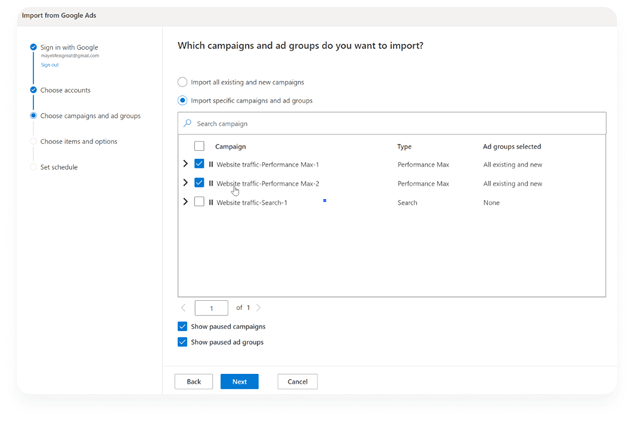
Many Microsoft Advertising accounts are direct imports from Google that get left largely untouched after initial setup. They’re running broad match with minimal negatives, ignoring audience network placement performance, and operating on autopilot. The result is an account that looks active but never actually improves.
Why it stalls performance
Microsoft Advertising behaves differently—in demographics, placements, and optimization logic. Imported structures rarely align with what works best on the platform.
The fix
Create new campaigns where possible instead of relying solely on imports. Apply negatives properly and segment your ad groups with intention. Review Audience Network placements and use exclusions where needed. Adjust your targeting based on Microsoft’s demographic skew, and use scripts or automation tools to handle routine optimizations.
“Set and forget” is one of the fastest ways to burn through budget without results.
5. Not Feeding Performance Max Enough Inputs
Performance Max can’t optimize what it doesn’t understand.
The problem
Accounts are often running Performance Max with no first-party audience signals, missing search themes, weak or non-compliant creatives, and incorrect image sizes or heavy text overlays. This starves the algorithm of the quality inputs it needs to function.
Why it stalls performance
Performance Max relies on breadth of signals. Without strong audience, creative, and intent inputs, delivery becomes unfocused and inefficient.
The fix
Add website visitors and previous converters as audience signals. Use search themes to guide intent and give the system direction. Follow creative best practice: use correct image ratios, keep text overlays minimal, and maintain a strong product or service focus.
With modern AI tools available, there’s no reason to skimp on creative inputs.
Struggling to get started with Performance Max on Microsoft Advertising? Download our checklist to unlock the power of PMax and skyrocket your ROI!
Final Takeaways for Small Budgets in 2026
Before increasing spend, ask yourself: Does our bid strategy match our data maturity? Is our structure realistic for the budget we actually have? Are we feeding the platform enough quality signals? Have we adapted campaigns to Microsoft, or just imported them and moved on?
Key principles to remember:
- Match your bid strategy to your conversion volume.
- Build structure around budget reality, not wishful thinking.
- Use audience data aggressively.
- Optimize Microsoft accounts intentionally, not as an afterthought.
- …And feed automation properly – garbage in, garbage out still applies.
Small budgets don’t need complexity. They need clarity, consolidation, and patience.
Want to take your small budget further? Adzooma makes helpful recommendations and helps you to manage all of your campaigns and ad tools in one platform. Sign up free today!