

Use August to audit your Google Ads account before Q4. Review search terms, budgets, ads, audiences and conversion tracking to improve performance before peak season.
August is one of the best times to audit a Google Ads account. There is still time to fix problems before Q4 pressure starts. By October, CPCs are often higher, budgets are being questioned and everyone wants more leads yesterday. August gives you a quieter window to check whether the account is actually ready for that demand, rather than waiting until peak season to discover the tracking is messy, the audiences are too small or the best campaign is still capped by budget.
This shouldn’t be treated as a full account rebuild. That’s where people often overcomplicate things. The aim is to identify the issues that will become more expensive later: wasted search terms, weak conversion signals, budget sitting in the wrong places and campaigns that haven’t been reviewed properly since spring. Fix those now and you’ll go into Q4 with a much better chance of making the existing budget work harder.
Start with the searches you’re paying for
Go to Insights and reports > Search terms, set the date range to the last 90 days and sort by Cost. This isn’t about finding one strange query and feeling productive. You’re looking for patterns in search intent.
If a campaign is designed to generate enquiries, but budget is regularly being spent on searches containing words like “jobs”, “course”, “free”, “template”, “DIY” or “how to”, that spend is unlikely to help during Q4.
Add the obvious negative keywords, but don’t stop there. Check which keywords are triggering those searches. If the same broad match keyword repeatedly attracts poor-quality traffic, the issue isn’t just a few irrelevant search terms – it’s the level of control being given to Google.
Tighten the keyword, split the ad group or review whether that match type still makes sense. By the end of this check, the account should be paying for fewer clicks that were never likely to convert.
Check whether your best campaigns have enough room to grow
Open Campaigns and customise the columns to include:
- Cost / Conv.
- Search Impression Share
- Search Lost IS (Budget)
- Search Lost IS (Rank)
Sort by Cost per conversion and focus on campaigns with enough data to trust.
The objective is simple: identify campaigns already generating leads at an acceptable cost but losing impression share because of budget.
This is where many accounts quietly waste opportunity. A strong campaign is capped while weaker campaigns continue spending because the budget split was decided months ago and never revisited.
If your best-performing campaign is losing available impressions because of budget, consider reallocating spend before asking for additional budget. Q4 isn’t the time to be sentimental about campaign budgets. Put the investment where it’s already proving it can deliver.
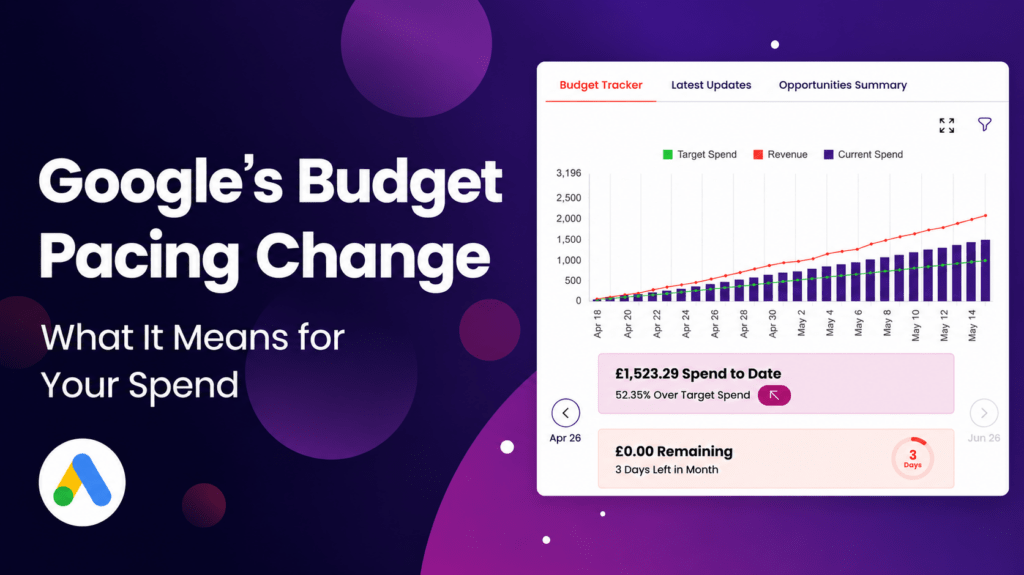
Are you up to date with Google’s budget pacing? Understand what it means for your spend and profits in our recent article.
Review the ads that have quietly gone stale
Open one of your key Search campaigns, head to Ads, and compare the last 90 days with the previous 90 days.
Review CTR, conversion rate and cost per conversion together rather than in isolation.
If impressions are stable but CTR has fallen, the ads may no longer be standing out against competitors.
If CTR remains healthy but conversion rate has dropped, the disconnect may be between the promise in the advert and the experience on the landing page.
Before Q4, refresh the ad groups that already generate meaningful leads. Update headlines and descriptions to reflect what buyers are thinking about now – planning ahead, limited availability, seasonal demand, faster turnaround or preparing before peak season.
There’s no need to rewrite every advert. Start with the campaigns that matter most and make the message stronger.
Make sure conversion tracking isn’t feeding Google the wrong signals
Go to Goals > Conversions and review every action included in the Conversions column.
Ask whether each action genuinely represents the type of lead you want more of.
If page views, newsletter sign-ups or low-intent downloads are being treated as primary conversions, Google may optimise towards volume rather than quality.
Check for duplicate form submissions, broken phone tracking and actions that should be secondary instead of primary.
If Enhanced Conversions or Offline Conversion Imports are available, August is the ideal time to make sure they’re working correctly.
Better data won’t magically improve performance, but poor-quality conversion data will almost certainly limit it.

Build audiences before you need them
Open Tools > Shared Library > Audience Manager and review your remarketing audiences.
A single “All Visitors” audience isn’t enough.
Look for audiences built around:
- High-intent service pages
- Pricing pages
- Form starters
- Previous converters
- Users who visited key pages but didn’t enquire
There’s no need to launch every remarketing campaign today.
The immediate objective is to make sure these audiences exist and are collecting data.
Waiting until October to build them gives you fewer opportunities to reconnect with potential customers when competition is highest.
Use AI to speed up the health check
AI is most valuable when it’s treated as an analyst rather than a decision-maker.
Instead of manually jumping between reports, start with a prompt such as:
“Compare the last 90 days with the previous 90 days. Show me where budget efficiency has declined, which campaigns have the biggest Q4 opportunity and what should be investigated first.”
This is exactly where OmniAI Ad Connectors fit naturally.
Rather than piecing together search terms, campaign performance and conversion data manually, you can ask questions about your live Google Ads account in plain English and use the answers to guide your investigation.
The judgement still sits with the advertiser. AI simply helps uncover the areas worth investigating much faster.
Final Thoughts
August isn’t the month to panic or make dramatic changes for the sake of looking busy.
It’s the month to prepare.
Review the searches you’re paying for. Challenge the current budget split. Refresh tired adverts. Clean up conversion tracking and build the remarketing audiences you’ll wish you already had when Q4 arrives.
None of these checks require a larger budget.
They simply help make better use of the budget that’s already there.
Do the work in August and you’ll head into Q4 with a Google Ads account that’s ready to capture more demand, not just spend more trying to find it.
Stop digging through Google Ads reports manually. Let OmniAI Ad Connectors surface what matters before Q4. Try it today!